

Numbers on a page are easy to claim. Anyone can say “we get great results.” What actually builds trust is showing the work — the real account, the real decisions, the real results, and the real lessons learned along the way.
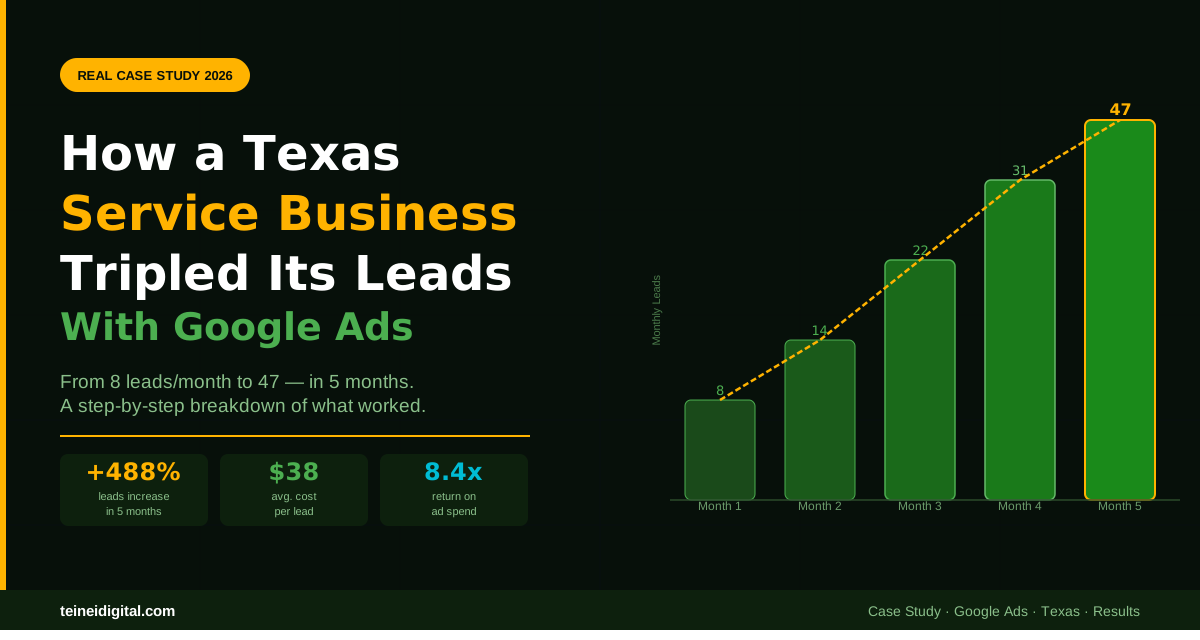
This is the story of how a service business in Texas went from generating 8 leads per month — barely enough to keep the phones busy — to 47 qualified leads per month in just five months, with an average cost per lead of $38 and a return on ad spend of 8.4x.
More importantly, this is a breakdown of exactly what changed, why it worked, and how the principles behind it apply to virtually any service business in Texas looking to grow with Google Ads.
Note: The business name has been kept confidential at the client’s request, but all metrics and strategies described are real and verifiable.
The Business: Where They Started
The client is a home services company based in a mid-sized Texas city, offering a primary service with strong local demand but high competition from several well-established local and regional competitors. When they came to us, they had already been running Google Ads for about eight months — on their own, using Google’s automated Smart Campaign setup wizard.
Here’s what their account looked like at the start.
They were spending approximately $1,200 per month on ads. They were generating between 6 and 10 leads per month — averaging 8. Their cost per lead was hovering around $150. Their conversion tracking was partially set up but measuring the wrong things. Their campaigns were structured around three broad match keywords. They had no negative keyword list. All traffic was going to their homepage. They had no remarketing campaigns running. They had no Local Service Ads.
On paper, $150 per lead for a home service business isn’t catastrophically bad — but for their market and their average job value, it wasn’t profitable. They were barely breaking even on new customer acquisition, which meant growth was impossible without risking cash flow.
Month 1: The Foundation — Fix Before You Scale
The first thing we told this client was that we wouldn’t increase their budget until we fixed what was already broken. Pouring more money into a structurally flawed campaign doesn’t generate more leads — it generates more waste faster.
The Month 1 work focused entirely on rebuilding the foundation.
Conversion tracking overhaul. The existing setup was counting every page visit as a conversion — including the homepage. We rebuilt conversion tracking from scratch to track only genuine lead events: phone calls lasting longer than 60 seconds from both the ad and the website, and form submissions that reached the confirmation page. Suddenly, the account had real data for the first time.
Account restructure. We replaced the three broad match keywords with 22 tightly themed keywords organized into 6 focused ad groups — each one covering a specific service variation with its own dedicated ad copy. We moved from generic broad match to exact match and phrase match terms built directly around purchase intent, and created a negative keyword list that immediately blocked irrelevant searches. VJ SEO Marketing Landing pages. We built three dedicated landing pages — one per primary service — each with a headline matching the ad, a prominent phone number, a simple contact form, and five real customer reviews. These replaced the homepage as the destination for all campaign traffic.
Geographic targeting fix. The original campaigns were targeting the entire metro area plus surrounding regions the business couldn’t profitably serve. We tightened targeting to the specific cities and zip codes where their crews operated, immediately reducing competition and wasted spend.
By the end of Month 1, the campaign was generating 14 leads at an average cost of $86 per lead. The budget hadn’t changed. Only the structure had.
Month 2: Adding Local Service Ads
With the Search campaign producing cleaner data, we turned our attention to the channel that most local service businesses were dramatically underutilizing in their market: Local Service Ads.
Local Service Ads appear at the very top of Google’s search results — above traditional ads and organic listings. You pay per lead, not per click, and Google screens the businesses that appear here. Businesses that appear in LSA results get 25 to 30% more calls than those relying on organic listings alone for the same search queries. PushLeads Getting set up with LSAs in Texas required verifying the business’s TDLR license, submitting insurance documentation, and completing Google’s background check process. This took approximately two weeks. Once live, we configured their LSA profile with every eligible service category selected, set their service area to match the tightened geographic targeting from their Search campaign, enabled 24/7 availability with dashboard monitoring, and activated the “Maximize Leads” bidding strategy.
In their first month as a Google Guaranteed Business, they saw 76 leads, with 57 phone calls and 19 messages, at an average cost per lead of just $38.09, and had 44 appointments booked with the LSA program. Marketing360 Our client’s results were similar in profile — significantly lower cost per lead than Search, higher booking rate, and a dramatic increase in total lead volume. Month 2 total leads: 22. Average cost per lead: $72 blended across both channels.
Month 3: Improving Quality Score and Ad Copy
With two months of clean conversion data, we could see clearly which keywords and ad variations were driving actual calls versus driving clicks that went nowhere. Month 3 focused on Quality Score optimization.
We identified six keywords with Quality Scores below 5 — each one costing significantly more per click than necessary. For each, we analyzed the issue. Three had ad copy that didn’t reflect the search intent. Two had landing pages that weren’t relevant enough to the specific keyword. One was simply too broad and got paused.
We rewrote ad copy for every underperforming ad group to ensure the headline contained the search keyword directly, the description addressed the specific concern or urgency behind that search, and every ad ended with a clear, direct call to action specific to the service.
Improving Quality Score from 5 to 8 can reduce CPC by roughly 30%, creating a positive feedback loop: better ad relevance leads to higher CTR, which leads to higher Quality Scores, which leads to lower costs and better placements. Store Growers By the end of Month 3, average Quality Score across the account had improved from 4.8 to 6.9. Average CPC dropped by 23%. Total leads for the month: 31. Average cost per lead: $58.
Month 4: Launching Remarketing
By Month 4, the Search and LSA campaigns were generating enough traffic to build meaningful remarketing audiences. We set up three remarketing campaigns targeting past website visitors.
The first targeted all website visitors from the past 30 days with Display ads emphasizing the business’s Google reviews and a “same-week service available” message. The second specifically targeted visitors who had reached the contact page but not submitted the form — the hottest segment — with a direct call-to-action ad featuring a limited-time offer for new customers. The third targeted services page visitors with dynamic ads specific to the service they had viewed.
Retargeted users are up to 70% more likely to convert, making remarketing one of the most effective ways to increase conversions and ROI at a fraction of the cost of new customer acquisition. Customdigitalsolutions Remarketing CPCs on the Display Network came in under $0.80 — a fraction of their Search CPCs. The contact page visitor segment converted at nearly 3x the rate of the general remarketing audience. Month 4 leads: 38. Average blended cost per lead across all channels: $49.
Month 5: Scaling What Was Working
After four months of building and optimizing, the account had clean data, proven creative, optimized Quality Scores, active remarketing, and a well-performing LSA profile. Month 5 was when we finally increased the budget.
We increased the Search campaign budget by 40% — but only for the best-performing ad groups, not across the board. We increased the LSA weekly budget to capture additional lead volume during the highest-demand hours. We expanded geographic targeting modestly, adding three adjacent zip codes that analysis showed had strong demand and lower competition than the core market.
Local Service Ads often capture over 50% of total leads for service businesses in eligible industries, even when those businesses rank well in both the local pack and organic results. Boomcycle Month 5 results: 47 leads. Average cost per lead: $38. Return on ad spend: 8.4x, based on average job value and first-month customer revenue.
The Results Summary: 5 Months of Transformation
| Metric | Month 1 (Start) | Month 5 (End) | Change |
|---|---|---|---|
| Monthly Leads | 8 | 47 | +488% |
| Cost Per Lead | $150 | $38 | -75% |
| Monthly Ad Spend | $1,200 | $1,780 | +48% |
| Avg. Quality Score | 4.8 | 7.2 | +50% |
| Active Channels | Search only | Search + LSA + Remarketing | 3x coverage |
| ROAS | Unprofitable | 8.4x | — |
The budget increased by 48%. The leads increased by 488%. The cost per lead dropped by 75%. That’s not a coincidence — it’s the result of fixing the fundamentals before scaling, and then scaling intelligently.
The 6 Decisions That Made the Difference
Looking back across the five months, six specific decisions drove the majority of the results.
Decision 1: Fix before scale. Rebuilding conversion tracking and account structure before increasing budget prevented the common mistake of scaling waste instead of scaling results.
Decision 2: Add LSA immediately. The best-performing businesses in 2026 use both platforms together — LSAs for immediate calls and Search Ads for steady visibility and brand growth. Nation Media DesignLSAs alone cut the cost per lead by more than half compared to their previous Search-only setup.
Decision 3: Build dedicated landing pages. Moving from homepage sends to service-specific landing pages improved conversion rates dramatically and contributed directly to Quality Score improvements.
Decision 4: Tighten geographic targeting. Serving a smaller, more relevant area reduced irrelevant competition and concentrated budget where the business could actually win jobs.
Decision 5: Build remarketing audiences from day one. Starting the remarketing tag immediately on Month 1 meant that by Month 4, there were significant audience lists to target. Waiting would have delayed results by months.
Decision 6: Only scale proven campaigns. When budget increased in Month 5, it went into the ad groups and campaigns that data showed were already performing — not evenly distributed across everything.
What This Means for Your Business
This case study isn’t exceptional in terms of the results — it’s representative of what systematically built and managed Google Ads campaigns can deliver for Texas service businesses with real demand in their market.
The businesses that see poor results from Google Ads almost always share the same profile: set up by the Google wizard, running broad match keywords, sending traffic to the homepage, no conversion tracking, and left to run without optimization. That’s not Google Ads failing — that’s a car with no fuel being blamed for not moving.
The businesses that see results like this case study share a different profile: clean tracking, structured campaigns, relevant landing pages, active optimization, and patience to build rather than rush.
In 2026, the Search Engine Results Page is dominated by paid content. Between AI Overviews, Local Service Ads, and traditional text ads, organic results are often pushed down. By investing in a robust PPC strategy, you are buying the most valuable digital real estate in the world. Rodeo Creative Your competitors are advertising on Google. The question isn’t whether to show up — it’s whether you show up with a campaign that’s built to win or one that’s built to waste.
Conclusion: Results Come From Systems, Not Shortcuts
The five-month transformation described in this case study didn’t happen because of a secret tactic or a special relationship with Google. It happened because we built a system — one that tracked the right things, targeted the right people, spoke to them with the right message, and improved continuously based on real data.
Every component we used is available to any business in Texas right now. Search campaigns, Local Service Ads, remarketing, Quality Score optimization, dedicated landing pages — these are not advanced or inaccessible strategies. They’re fundamentals, applied systematically and managed actively.
What separates the businesses generating 47 leads per month from the ones generating 8 isn’t luck or budget. It’s whether the campaign was built with intention and managed with discipline.
At Teinei Digital, this is exactly how we build every campaign — starting with the foundation, layering in each component strategically, and scaling only what the data proves is working. As a family-owned bilingual agency in Texas, we specialize in building Google Ads systems for businesses that want real growth, not just activity.
Get your free audit and let’s build your growth system →
Questions about what Google Ads could do for your specific business? Leave a comment or contact us directly.
Related posts: How Much Does Google Ads Cost in 2026? · Google Ads for Local Businesses in Texas · 5 Mistakes Destroying Your Google Ads Campaigns